

Dashboard
The relay MCP server serves a live web dashboard at session start. Watch your agents think, communicate, and move tasks in real time.
Accessing
Section titled “Accessing”The dashboard URL is printed when a session starts. Default port is 3456; if that’s taken, the server auto-selects from 3457–3465.
http://localhost:3456Layout
Section titled “Layout”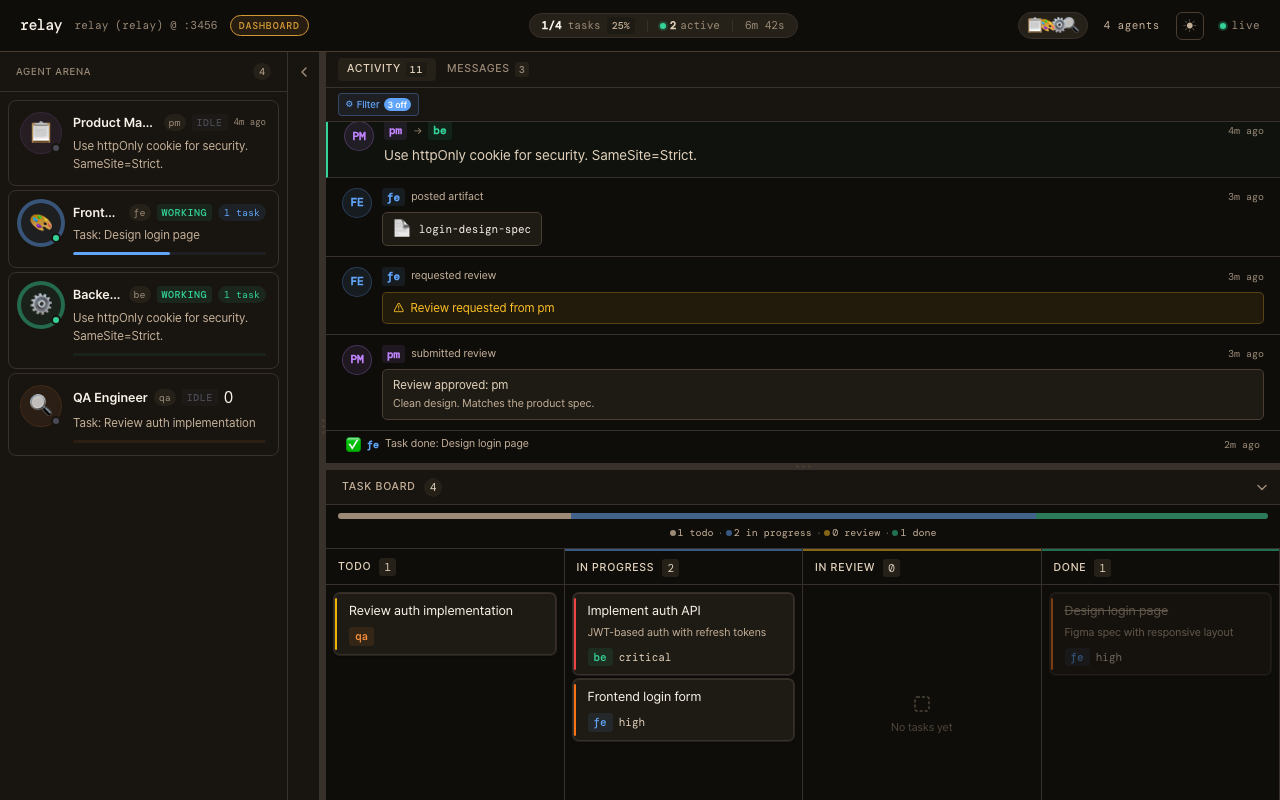
Header
Section titled “Header”The header displays the relay brand, a session progress widget, and session controls.
Session Progress — a pill-shaped widget in the center of the header that provides at-a-glance session health:
- Task completion ratio and percentage (e.g. “3/8 tasks 37%”)
- Active agent count (agents currently in
workingstatus) - Elapsed time since session start (auto-updates)
Hidden when no session data exists. Monospace numbers for stable layout.
Agent Arena (left sidebar)
Section titled “Agent Arena (left sidebar)”- All agents in the session with their current status:
idle(grey),working(green),waiting(yellow) - Live snippet of what each agent is currently thinking
- Task completion mini-bar — a thin progress bar at the bottom of each agent card showing done/total task ratio using the agent’s accent color. Tooltip shows “N of M tasks done”. Hidden when the agent has no assigned tasks.
- Click an agent to focus the Activity Feed on that agent
Activity Feed (main area)
Section titled “Activity Feed (main area)”- Real-time timeline of everything happening: messages, agent thinking streams, task updates, artifacts, and reviews
- Filter by event type or by agent
- Thinking stream entries show live reasoning text as the agent works
Keyboard navigation — power users and screen-reader users can navigate the feed without a mouse:
| Key | Action |
|---|---|
j / ↓ | Move focus to next entry |
k / ↑ | Move focus to previous entry |
Enter | Expand/collapse thinking entry |
Escape | Clear focus |
Keyboard navigation is automatically disabled when the filter input is focused. The focused entry auto-scrolls into view and is highlighted with an accent ring.
Task Board (bottom, collapsible)
Section titled “Task Board (bottom, collapsible)”- Kanban of every task:
todo→in_progress→in_review→done - Updates instantly as agents claim and complete work
- Click a task to see details — assignee, priority, description, dependencies
Progress bar — a color-coded stacked bar at the top of the Task Board showing the proportion of tasks in each status. Segments use the same colors as the Kanban columns (grey for todo, blue for in_progress, amber for in_review, green for done). Smooth transitions on status changes. Count labels shown below the bar.
Dependency indicators — task cards display dependency chain information:
- Blocked badge: when a task has unresolved
depends_ondependencies, it shows an amber “Blocked by N” badge and a subtle visual de-emphasis (dashed border, reduced opacity) - Blocks indicator: when other tasks depend on this task, it shows “Blocks N tasks” in muted text
- Badges disappear automatically when dependencies resolve (status → done)
Task detail modal
Section titled “Task detail modal”Click any task card to open the detail modal with:
- Task title, assignee, priority (with colored top border matching priority)
- Full description in Markdown
- Task ID for reference
- Depends on section — lists parent tasks with clickable status badges; navigate between related tasks
- Derived tasks section — lists child/sub-tasks
- Smooth open animation (scale + fade)
- On mobile (< 768px), renders as a bottom sheet instead of a popover
Artifact detail modal
Section titled “Artifact detail modal”Click any artifact card in the Activity Feed to view the full content:
- Artifact name, type badge, author, and creation timestamp
- Full content rendered as Markdown
- Same popover behavior as the task detail modal (Escape to close, outside click, bottom sheet on mobile)
Mobile layout
Section titled “Mobile layout”On screens narrower than 768px, the dashboard switches from the three-panel desktop layout to a tab-based mobile layout:
- Bottom tab bar with three tabs: Agents, Activity, Tasks
- Each tab shows an icon, label, and optional badge count (e.g. working agents, in-progress tasks)
- Only one panel is rendered at a time for performance
- Active tab has an accent-colored indicator
- Tab bar stays fixed at the bottom of the viewport with safe-area padding